
Traffic options
Whether direct visits take credit, and whether a cutoff event such as a sign-up ends the journey: the four options, one visitor, and who each suits
Before the Attribution Model splits a conversion's credit, something has to decide which visits are in line for it at all. That is what the traffic options do, and the visits they decide about are the direct ones: a customer who comes back by typing your URL or opening a bookmark. Whether those visits deserve a share of the credit depends on your business, which is why it is a setting.
The question matters because direct visits are common and they dilute. A visitor who clicks your ad once and then returns directly three times gives the ad a quarter of the credit under a linear model, even though the ad did the work. Some of that direct traffic is real intent; some is untracked referral traffic, links from emails, apps and PDFs that arrive without a referrer. Tagging every link you control is the first fix; the traffic options are the second.
One visitor, four answers
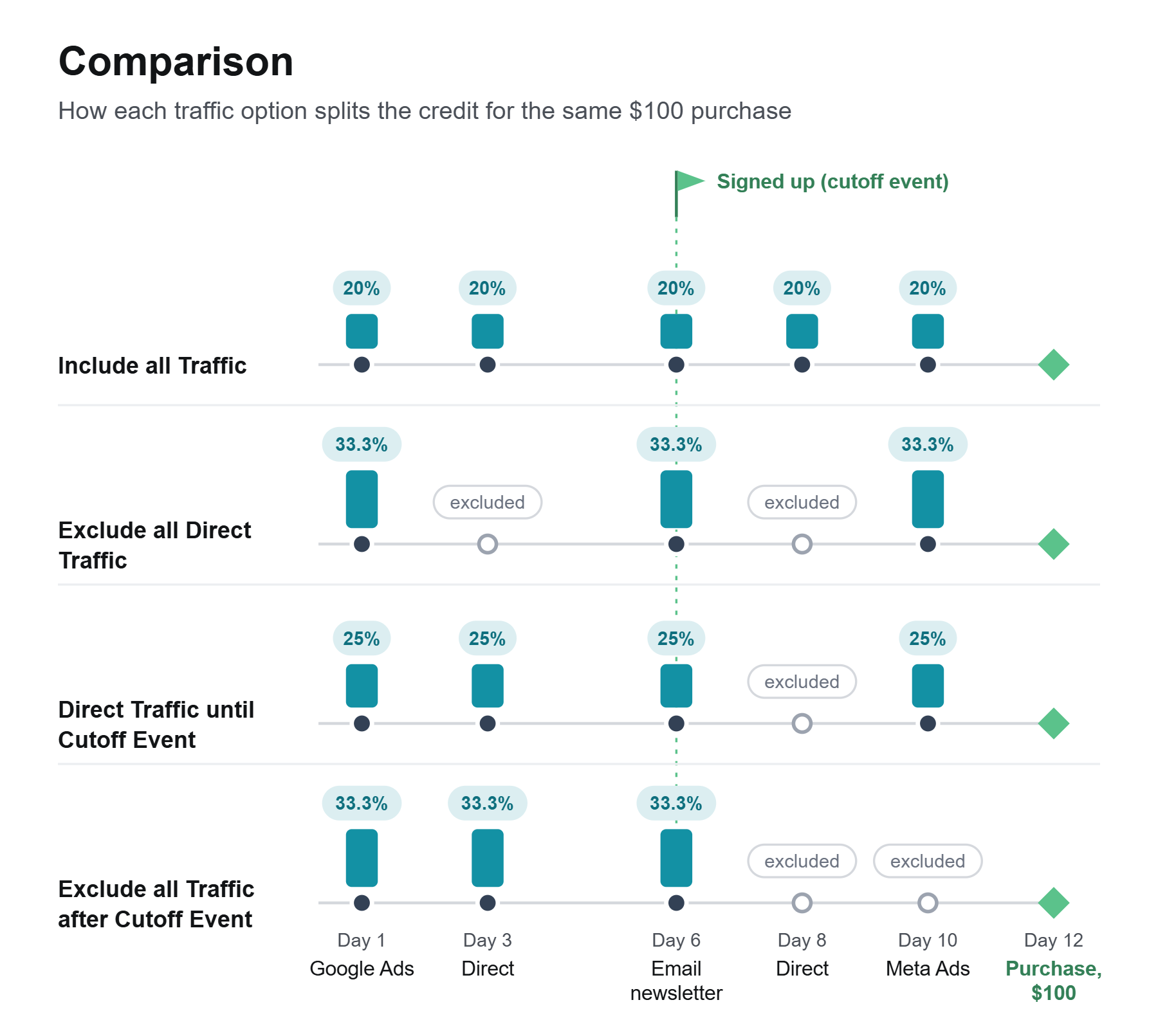
The diagrams follow one visitor: a Google Ads click on day 1, a direct visit on day 3, a newsletter click on day 6 during which they sign up, a direct visit on day 8, a Meta Ads click on day 10, and a $100 purchase on day 12. The sign-up is the cutoff event in the two options that use one. The model is Linear throughout, so the only thing changing between the four pictures is which visits are allowed to take credit.
Include all Traffic
Every visit is a touchpoint, direct ones included. Five visits, 20% each, and the two direct visits take 40% of the purchase between them.
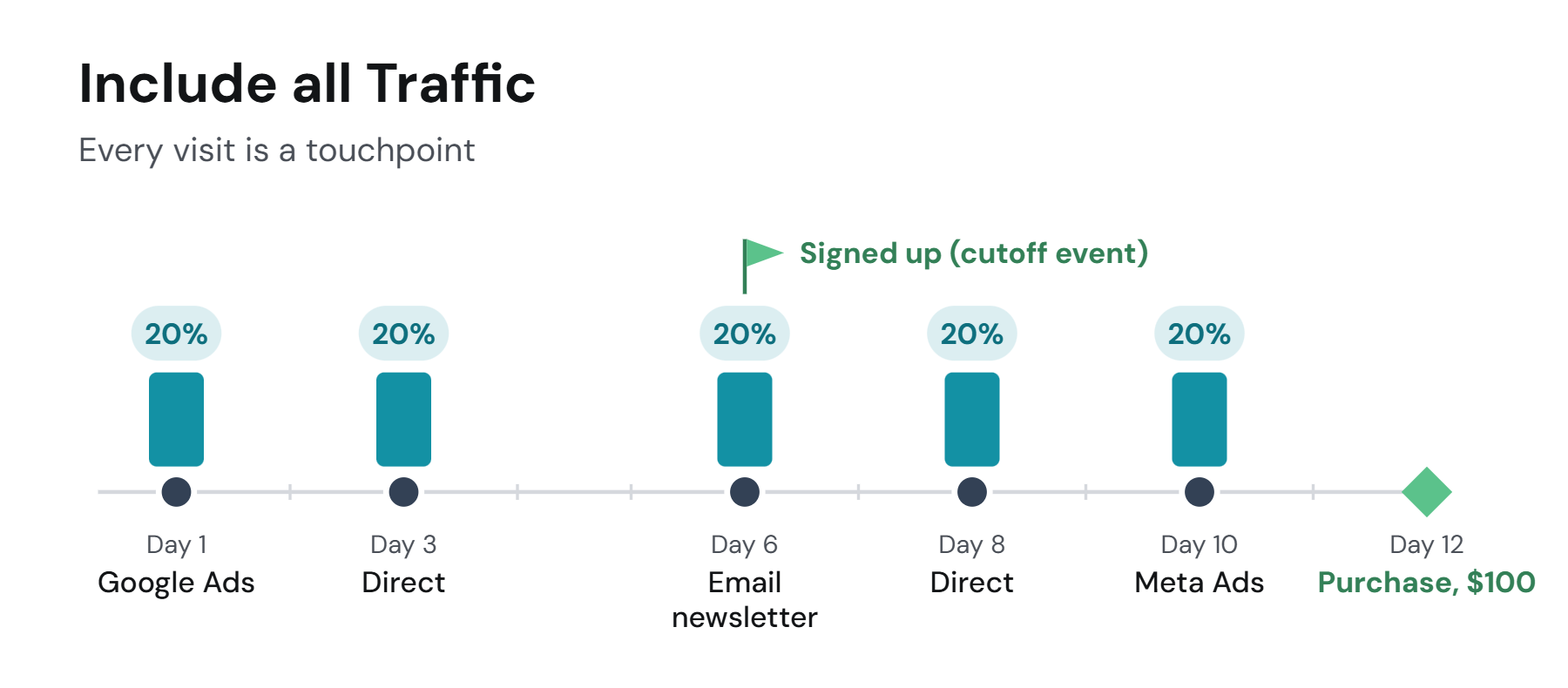
This is the default. It suits e-commerce and any business where a direct return is a real buying decision: the customer remembered you and came back to buy, and that visit earned its share.
Exclude all Direct Traffic
Direct visits never take credit. The three tracked visits share the purchase, 33.3% each, and the direct visits are left out of the split entirely.
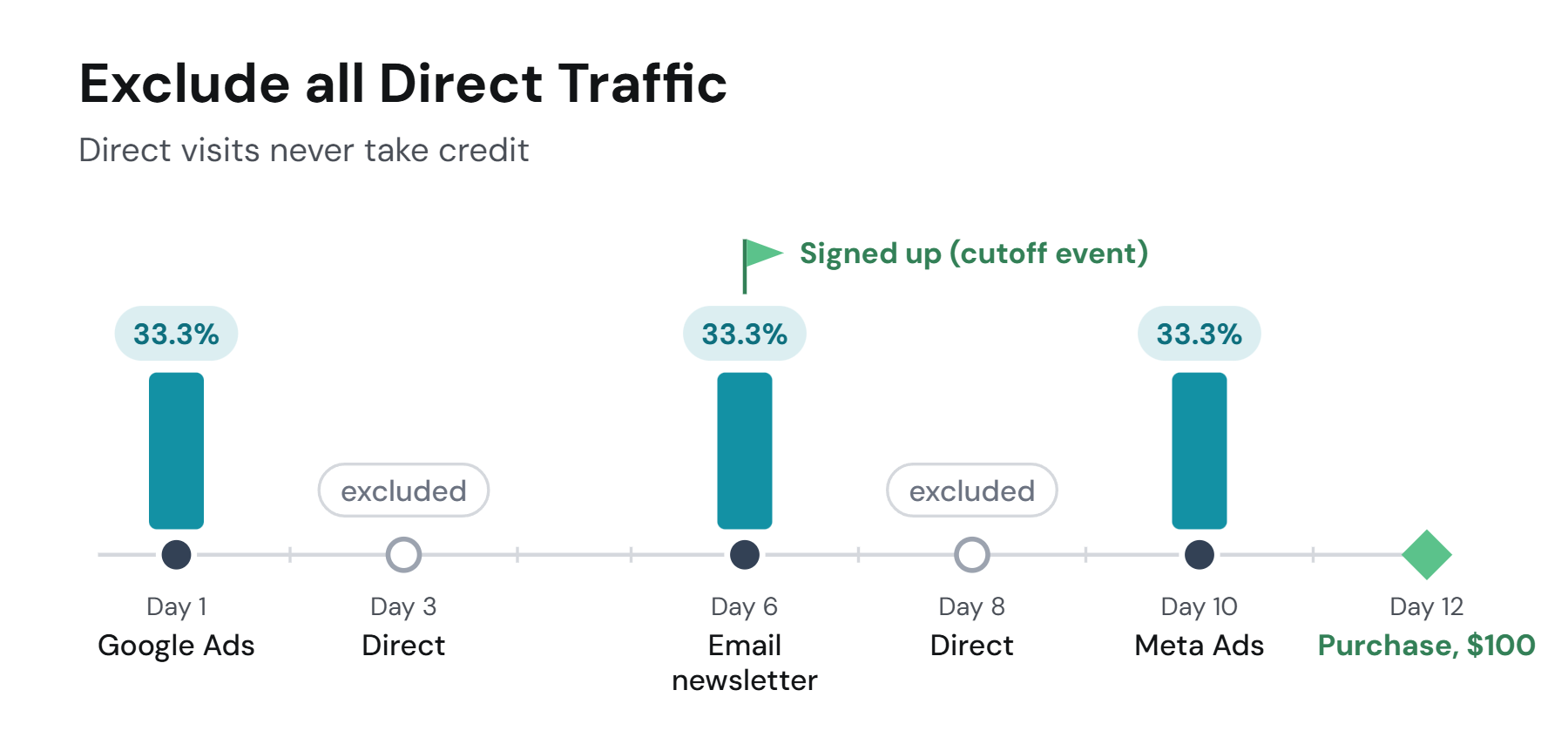
Two kinds of business choose this. Products people use every day, where almost every visit after the first is direct and would swamp the channels that actually brought the customer. And businesses with a large base of regular customers who buy again and upsell, where Direct dominates by default and the question that matters is what the other channels add on top of it. It is also a useful lens for anyone: switch to it for a moment and the dashboard shows what your marketing channels did with direct returns removed from the picture.
Include all Direct Traffic until Cutoff Event
Direct visits count until the visitor's cutoff event, and not after. Here the day-3 direct visit, before the sign-up, keeps its share; the day-8 direct visit, after it, is excluded. Four visits, 25% each.
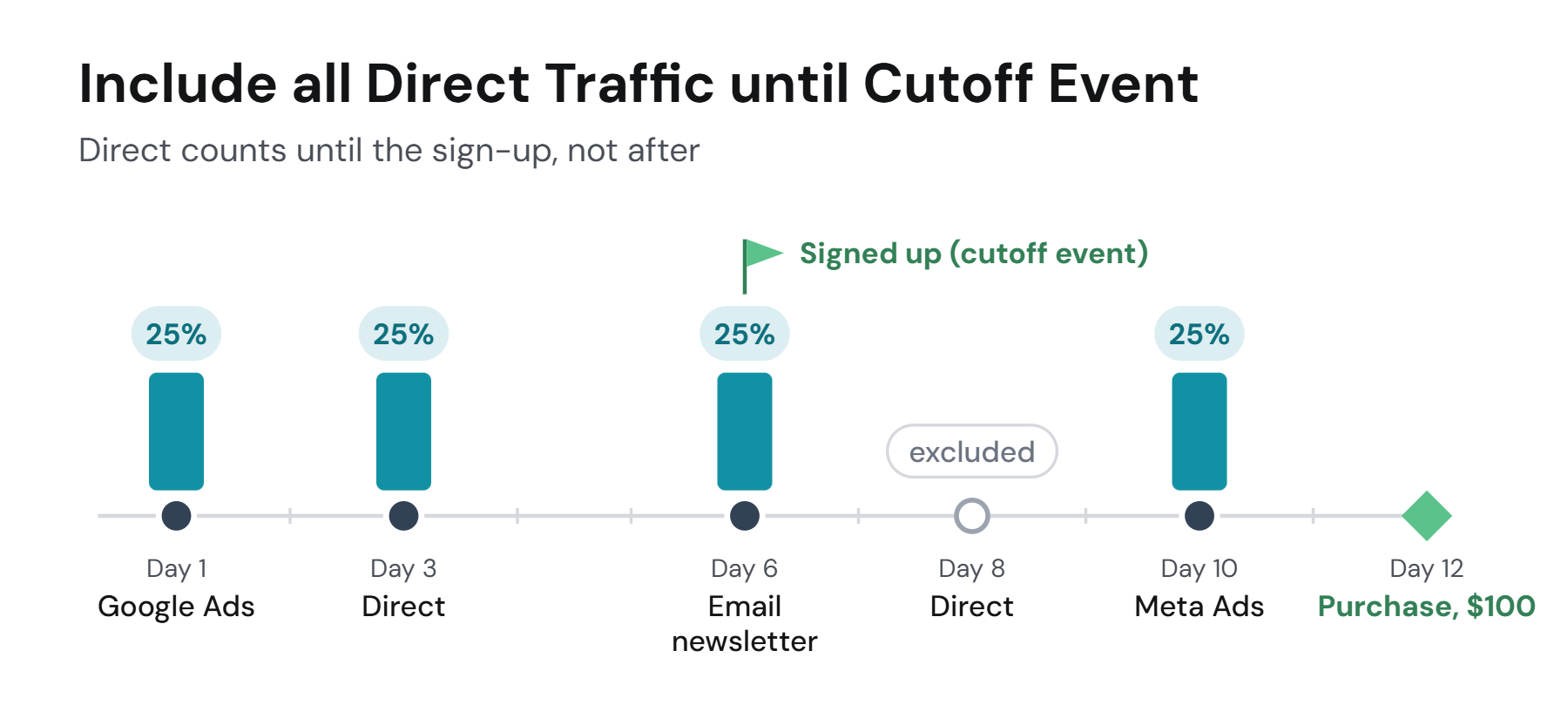
This is the common choice for SaaS, lead-driven and subscription businesses, with the sign-up, the lead capture or the trial start as the cutoff. Before that event a direct visit is still someone deciding; after it, direct visits are the product being used, and marketers do not want those diluting the ad credit for the purchase that follows.
Exclude all Traffic after Cutoff Event
Nothing the visitor does after the cutoff event takes credit, direct or not. The day-8 direct visit and the day-10 Meta Ads click are both excluded, and the three visits before the sign-up share the purchase, 33.3% each.
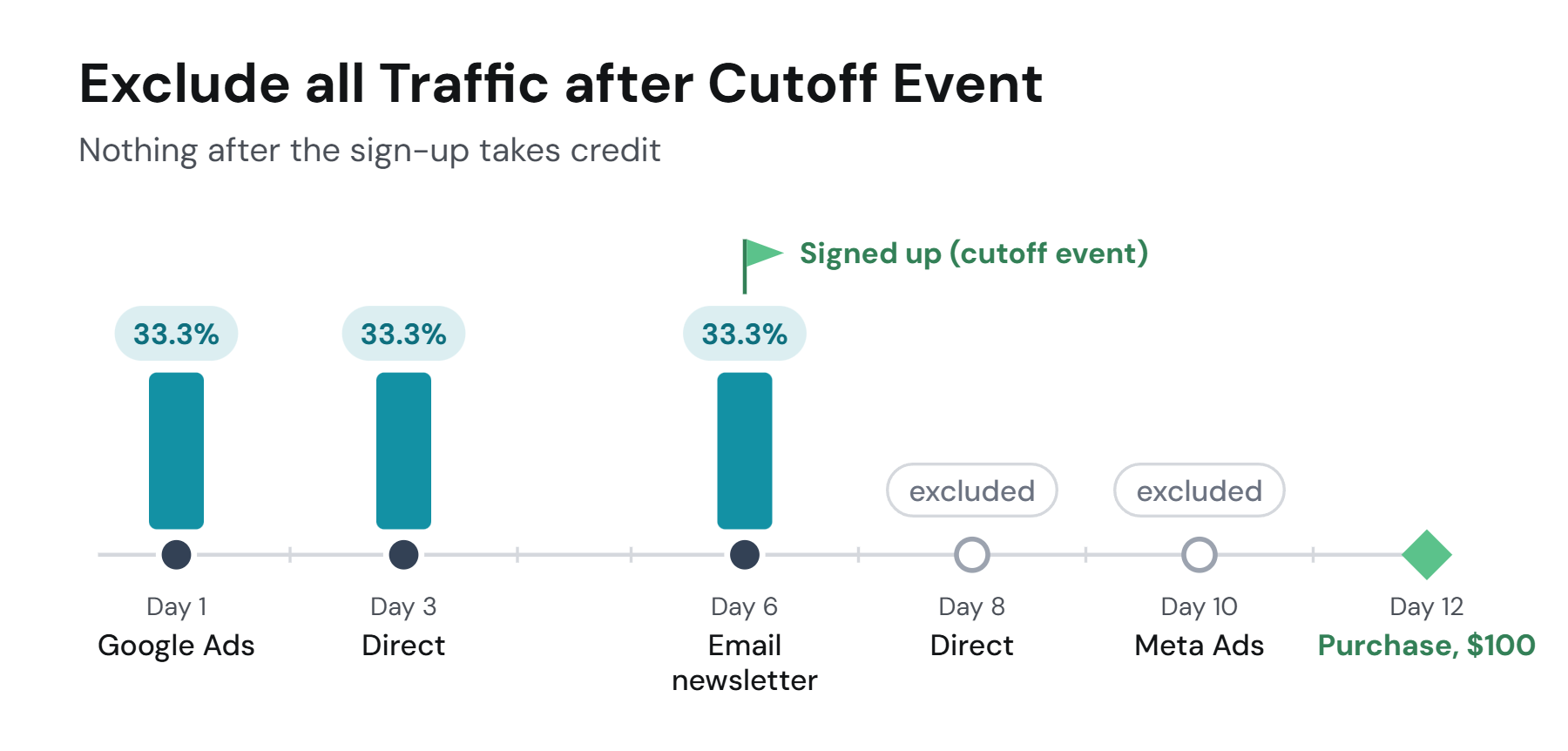
This fits a trial or subscription where the acquisition is complete at the cutoff: the question is which channels brought the customer to the sign-up, and whatever they clicked afterwards, including your own retargeting, should not earn acquisition credit for the purchases that follow.
The cutoff event
The cutoff event is one of your conversion events, chosen per view in the same place as the traffic option: typically the sign-up, the lead, the trial start or the first purchase. It applies per visitor, from the moment that visitor fires it. The event itself is not the conversion the dashboard measures; a view can count purchases while cutting off at sign-ups, which is the usual arrangement.
Where to set it
Traffic options are a setting of the view, so two saved views can treat direct traffic differently and the setting travels with the view into the reports. The current choice is shown under the model selector in the control bar, "All Traffic Included" or "Direct Traffic included until Signed Up", and clicking it opens the options; they are also in Project Settings. Changing the option re-splits the same visits and conversions, nothing is lost by trying each.
All four side by side
What counts as a direct visit is on Default channels; how the credit is then split is on Attribution models.
If you have any questions please contact [email protected].
Updated 20 days ago